Setting up DMARC (in German)
The order step by step: sending services, SPF, DKIM, p=none with rua, then tighten.
Free email check
Enter a domain and get four traffic lights – with a plain-language explanation of each finding and what to do about it.
Passive only: public DNS records and one request to the homepage, just like any browser makes. The domain is not stored. No sign-up.
Four things are checked
SPF
Which servers may send on your behalf – one record, at most ten DNS lookups.
DKIM
Whether a key for signing your mail is published under common selectors.
DMARC
What should happen to forged mail: nothing, spam folder or reject.
Website headers
HSTS, Content-Security-Policy, framing protection, X-Content-Type-Options, Referrer-Policy.
SPF, DKIM and DMARC are three records in your domain’s DNS. Together they define who may send email on your behalf and what should happen to a forgery. SPF lists the servers that are allowed to send. DKIM adds a signature to every mail whose public key is published in DNS. DMARC ties both to the sender address people see in their inbox and tells receiving servers what to do with a mail that passes neither check.
If DMARC is missing or set to p=none, anyone can send invoices using your sender address
without the recipient’s server ever being told to filter them out.
Green means: present and effective. Yellow: present, but with a gap. Red: missing, or so broken that receiving servers discard the record. Grey: not checkable because a server did not answer in time. The fourth line looks at the website itself: which security headers the homepage sends.
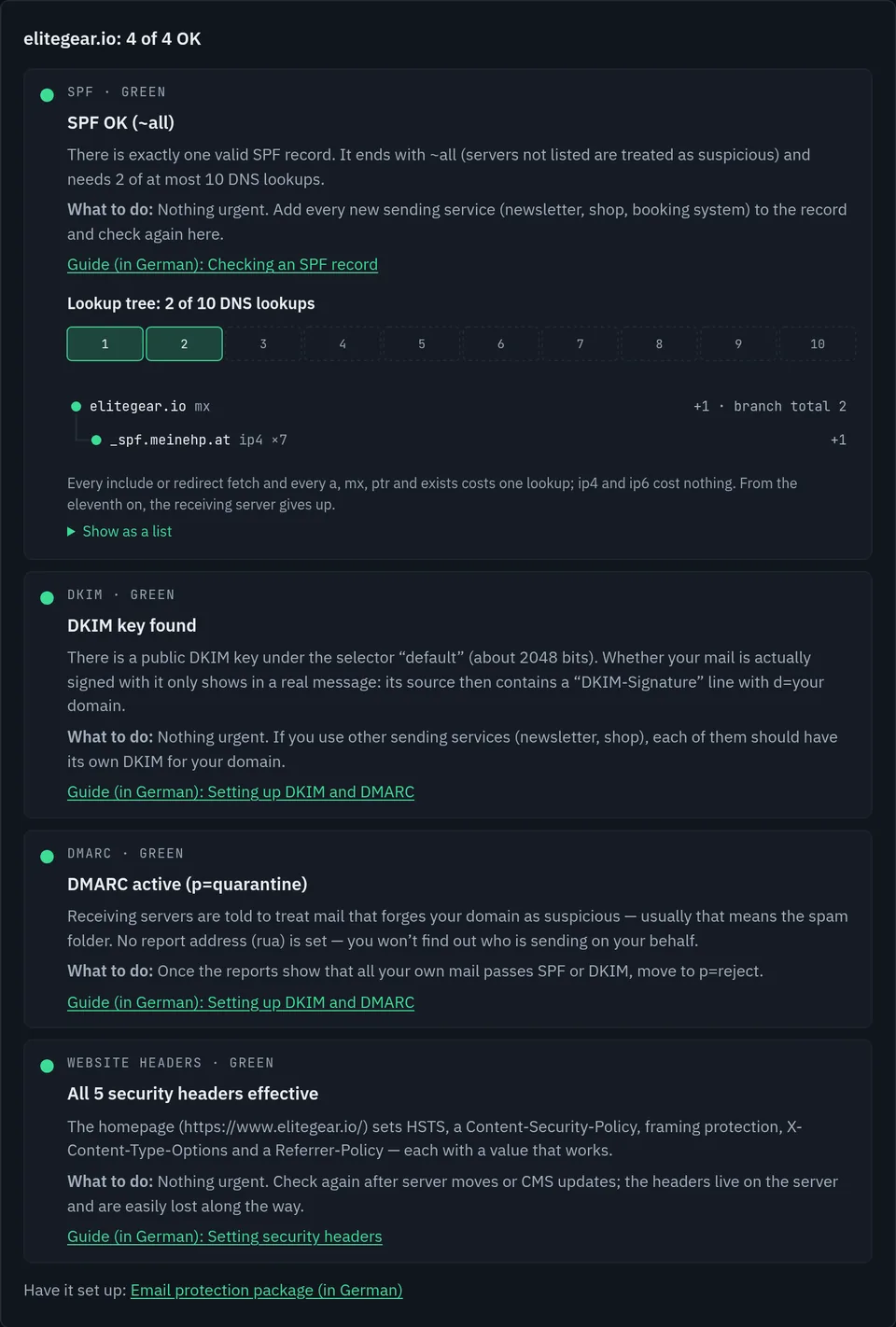
This is what a result with four green lights looks like, here for elitegear.io, one of my own domains. Even then, each light says what is left to do:
The check reads all TXT records of the domain and counts only those that start with v=spf1 – as
RFC 7208 requires. If there are two, receiving servers evaluate neither. If v=spf1 appears in
the middle of a record, that record is ignored; the check still reports it, because usually someone
wanted to allow something that is now not allowed.
It then follows every include and redirect and counts the DNS lookups a receiver
has to make. More than ten is an error under RFC 7208, and then even genuine mail fails the check.
Finally, it looks at how the record ends: -all and ~all are fine,
?all says nothing, +all allows every server in the world to send.
How to read a record by hand is explained in Creating and checking an SPF record (in German).
A DKIM key lives at <selector>._domainkey.<domain>, and the mail provider chooses the
selector freely. There is no DNS query that lists all selectors of a domain. The check therefore tries
30 common names, including google, selector1, selector2,
default, k1 and s1.
If it finds nothing, that does not mean there is no DKIM. That is why this line is yellow,
never red, when nothing is found. You can find your own selector in the source of a mail you sent: in
the DKIM-Signature line it appears after s=. Enter it above under “Enter a DKIM
selector” and the check tests exactly that one.
The record at _dmarc.<domain> is read. If a subdomain has no record of its own, the record of
the parent domain applies under RFC 7489 – with sp= if that is set. Several DMARC records side
by side count as none.
Green is p=quarantine or p=reject for all mail. p=none is yellow: the record
only monitors. A pct below 100 is also yellow, because the policy then applies to only part of
the mail. If rua is missing, nobody receives the reports that show who is sending on your
behalf – the finding says so. The steps from p=none to reject are described in
Setting up DMARC: SPF, DKIM and the _dmarc record (in German).
For the fourth line the check requests the homepage once over https, if needed also with
www. in front, and reads the response headers. Five are evaluated: HSTS,
Content-Security-Policy, framing protection (X-Frame-Options or
frame-ancestors), X-Content-Type-Options and Referrer-Policy. As in the
security scan (in German), the value counts, not mere
presence: an HSTS header with max-age=0 protects nothing. Values that work and the pitfalls
are covered in Security headers and SEO (in German).
It only reads what is public anyway: DNS records that every mail server queries when receiving mail, and the homepage as a browser loads it. It does not connect to mail servers, send test emails or scan ports – that is what the security scan (in German) is for.
The domain is not stored. It only stays in the memory of the checking function for up to 15 minutes, so that a repeated query does not recalculate. The only thing counted is that a check took place, so nobody runs the check non-stop: without an account it is at most eight checks per hour.
I ran the same checks in September and October 2026 against 149 domains in Tyrol, Austria: the main domains of all 34 regional tourism boards and 115 businesses, from dental practices to hotels. DNS on 27 and 29 September 2026, the headers of the 131 reachable homepages on 3 October 2026, all passive and based on public records. This is how the lights would look:
| Light | Finding | Domains |
|---|---|---|
| DMARC red | no record | 69 of 149 |
| DMARC yellow | p=none, monitoring only | 65 of 149 |
| DMARC red | two records side by side, counts as none | 1 of 149 |
| DMARC green | p=quarantine or p=reject | 14 of 149 |
| SPF red | no record | 14 of 149 |
| SPF red | two records starting with v=spf1 | 2 of 149 |
| Headers red | none of the five checked headers on the homepage | 48 of 131 |
| Headers | Content-Security-Policy present | 16 of 131 |
135 of 149 domains, 91 %, would show red or yellow for DMARC. SPF looks better: only 14 have no record at all. The gap is almost always the last step, the policy. The German article on email spoofing (in German) explains what the findings mean; it names aggregates only, as this page does.
The order step by step: sending services, SPF, DKIM, p=none with rua, then tighten.
Collecting every sending service, building the record, reading it by hand and finding the typical mistakes.
SPF, DKIM and DMARC set up with your existing provider, step by step up to reject, with four weeks of report analysis. €390 flat.
Yes, without sign-up and without an email address. Without an account, up to eight checks per hour are possible.
No. It only stays in the memory of the checking function for up to 15 minutes; the function writes it neither to a database nor to a log. For the hourly and daily limits, the fact that a check took place is counted – with a hash of the IP address, without the domain.
Because the name of the key, the selector, can be chosen freely and cannot be listed from the outside. The check tries 30 common names. You can find your own in the source of a mail you sent, in the DKIM-Signature line after s= – enter it above and the check tests exactly that one.
As a start, yes; as protection, no. With p=none no receiving server is told to filter out forged mail. p=none makes sense for a few weeks together with rua, to find all your own sending services in the reports – after that, quarantine and reject.
Because RFC 7208 says so: if a receiving server finds more than one record starting with v=spf1, it stops with an error and evaluates none of them. Several services therefore belong in one shared record as include.
The check only reads what is public anyway: DNS records that every mail server queries when receiving mail, and the homepage as a browser loads it. It does not actively test servers and does not send any mail.